Open the Back Office, search the catalogue, locate quantities, update stock, save, and return to the shop while the customer waits.
Product · Chrome / Edge · PrestaShop 1.6–9
Pep LogarFrontend Product
Editor + AI
Fix the product you are already viewing.
Edit prices, stock, references and content from your shop's public product page, without finding the product again in the Back Office.
No card for the trialPermanent free modeOne-time paymentNo modules

✎ Frontend Product Editor #1
PRESTASHOP1.6 · 1.7 · 8 · 9
A real situation
‘Can I buy it if it is out of stock?’
A customer calls because the storefront says there is no stock. You know the item is available; the product only needs updating.
Stay on the same page the customer is viewing. Change the quantity, review it and save. No second product search.
See it in action
From catalogue to saved change.
A real workflow: identify the product, edit it, use AI and verify the result.
Demo · 46 seconds · PrestaShop 9
Start without risk
Try everything. Decide later.
The trial starts only after the first successful connection to your PrestaShop shop.
Edit, review, verify, undo, dictate and use AI with every feature enabled.
Install, connect your shop and test the real workflow before buying.
After the trial, keep identifying products and opening their exact Back Office page.
Perpetual licences
One payment. Your tool.
Choose by number of shops and browser profiles. Both licences include every commercial feature.
Recommended
Shop
89 €one-time
For the owner or admin team of one PrestaShop shop.
- 1 PrestaShop shop
- Up to 6 Chrome or Edge profiles
- All commercial features
- Perpetual licence, no monthly fees
Multi-shop
Pro
179 €one-time
For businesses managing several shops or small multi-shop teams.
- 2 to 5 PrestaShop shops
- Up to 20 Chrome or Edge profiles
- All commercial features
- Perpetual licence, no monthly fees
Prices exclude applicable taxes. Purchase and licence delivery are handled by Lemon Squeezy as merchant of record.
What changes
Less searching. More catalogue fixed.
The extension follows your workflow instead of forcing you away from the product you are reviewing.
Edit where you spot the problem
Open the public page and change the product without locating it again.
Save through PrestaShop
Use the original forms and verify the result after saving.
Work with combinations
Recognise the selected combination and update the right stock or reference.
Improve content with AI
Work on names, descriptions, metadata and other editable Back Office fields.
Dictate, then decide
Review punctuation and polish the transcript before inserting it.
Keep control
Local history, undo preparation and configurable prompts.
How it works
Four steps. No duplicate search.
- 01
Connect
Sign in to the Back Office and save its path in the side panel.
- 02
Browse
Use the shop like a customer and spot the product that needs attention.
- 03
Edit
Open the floating control and change commercial data or jump to the admin page.
- 04
Verify
Save through PrestaShop and confirm automatically that the change was applied.
AI inside the Back Office
Work with the field. Not a separate box.
The assistant appears when you write or select content in a native field and prepares a proposal before inserting it.
- Improve, expand, shorten or correct.
- Optimise for SEO and translate.
- Apply rich formatting when the field supports HTML.
- Editable prompts and several providers, including local models.
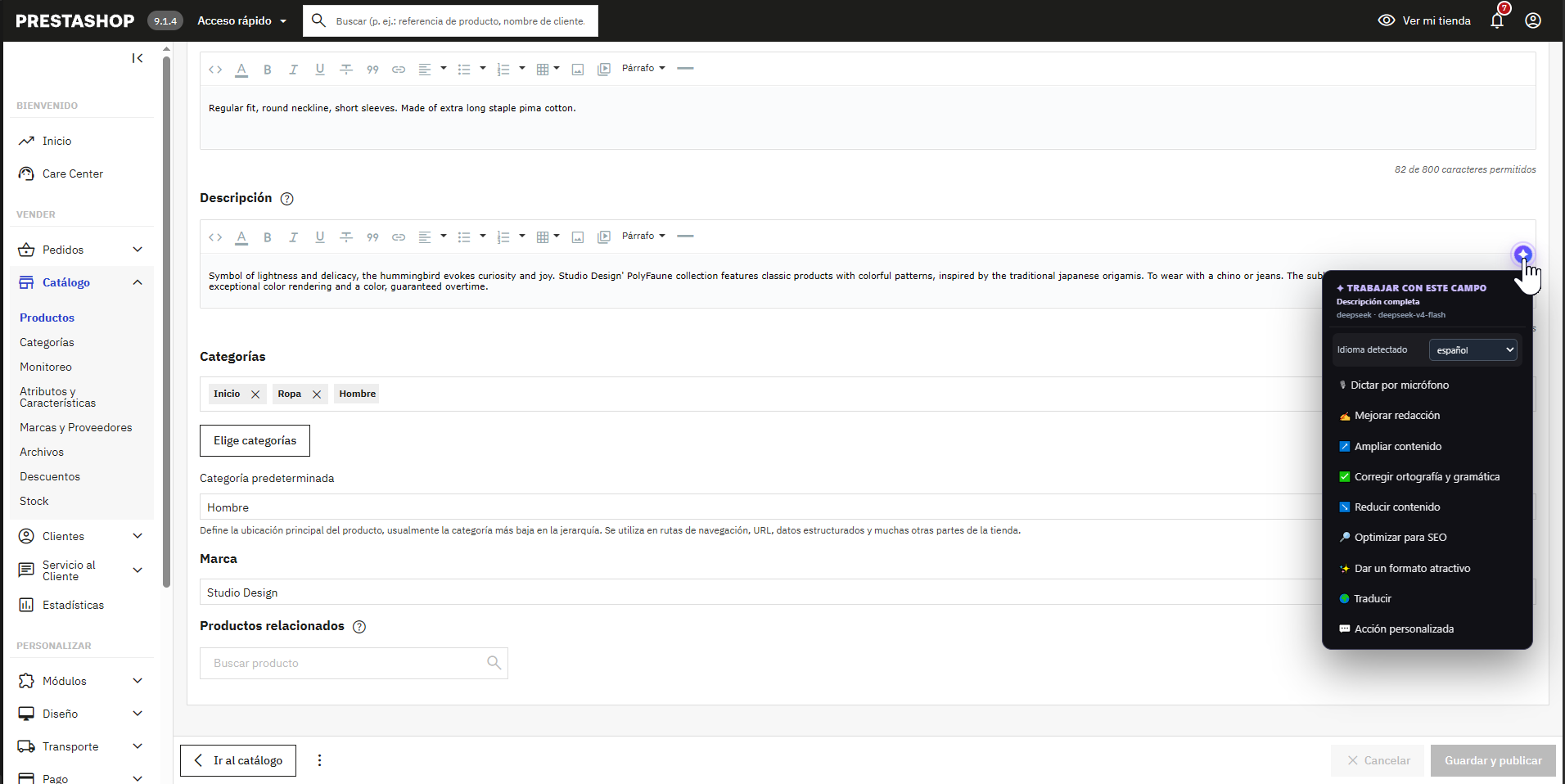 ✦ Work with this field
Clean installation
Your shop is not modified.
Not a module
No files, tables or overrides are installed in PrestaShop.
Uses your real session
Works with the forms and permissions of the open Back Office.
Leaves no residue
Uninstall the extension without leaving code behind in the shop.
Keys under your control
AI credentials stay locally in the browser profile.
Compatibility
What you need to start.
A straightforward setup with no server access and no changes to shop code.
- Browser
- Desktop Google Chrome or Microsoft Edge
- PrestaShop
- Adapters for 1.6 · 1.7 · 8 · 9
- Session
- Back Office open in the same browser profile
- Installation
- Browser extension, no PrestaShop module
- AI
- Optional cloud HTTPS provider or compatible local model
- Interface
- Spanish, English, French, Italian, German and Portuguese
Frequently asked questions
What matters before installing.
01When does the 14-day trial start?
After the first successful PrestaShop connection, not when the extension is installed.
02What remains after the trial?
The permanent free mode still identifies the product or combination and opens its exact Back Office page.
03Is the licence a subscription?
No. Shop and Pro are perpetual, one-time-payment licences.
04Does it install a module?
No. It is a Chrome and Edge extension and does not modify PrestaShop code.
05Where is the AI key stored?
In the local storage of the browser profile. Requests go directly to the selected provider.
06Can I edit products with variants?
Yes. The extension detects the selected combination and works with the corresponding data.
Available now
Install, connect and decide after trying it.
Install the extension from the Chrome Web Store, connect your shop and use every feature for 14 days. Afterwards, continue with the free mode or activate a perpetual licence.
Install extension ↗Full 14-day trial · no card required
Before installing or purchasing, read the Spanish privacy policy and licence, support and refund terms. Privacy · Terms